When the payload loses GPS signal, the system may display a warning or show missing GPS data.
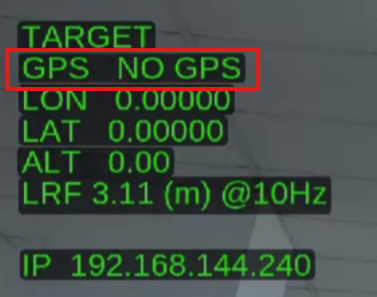
To resolve this issue, you need to configure the following parameters in Mission Planner or QGroundControl (QGC):
SR2_POSITION: "10" // receive GPS messages
SR2_EXT_STAT: "2" // receive GPS lock signal
After applying these settings, the payload should properly receive GPS information.
If the issue still persists, please contact Support@gremsy.com or submit a ticket via this portal for further assistance.
Was this article helpful?
That’s Great!
Thank you for your feedback
Sorry! We couldn't be helpful
Thank you for your feedback
Feedback sent
We appreciate your effort and will try to fix the article