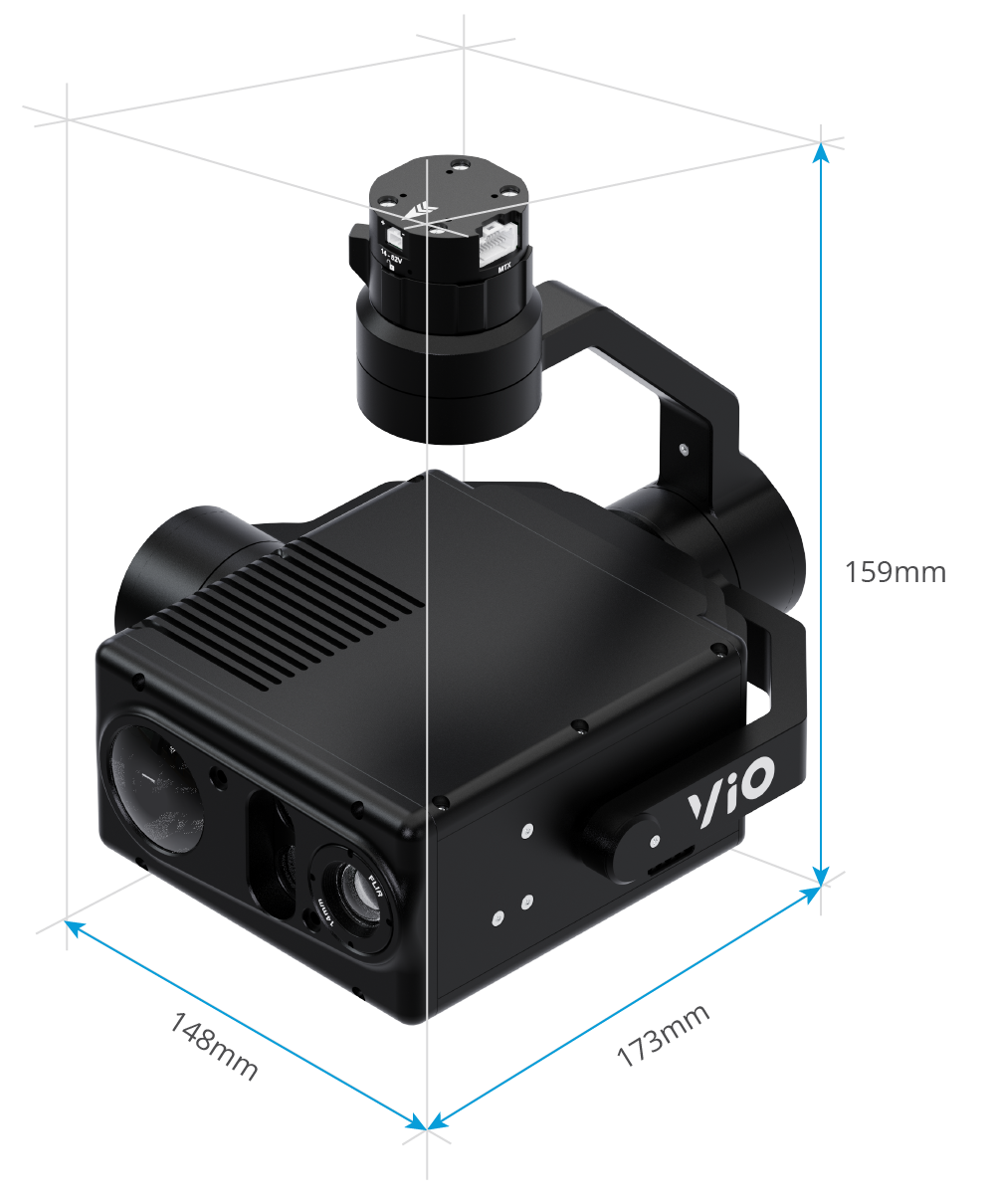
1. What is the size and weight of Vio?
Answer: The weight of the gimbal is 854G/ 1.88 LBS
2. What's the resolution of the photos and videos taken by Vio?
Answer:
EO
Photo: 3840 x 2160 (8.51 MP).
Video: 3840 x 2160 (4K@30fps).
IR
Photo: 640×512 Video: 640×512 @ 60fps (VIO F1).
Photo: 640×512 Video: 640×512 @ 30fps (VIO G1).
3. What is the function of the USB-C port on the camera?
Answer:
The USB-C port is used for upgrading the firmware of the camera.
4. Does Vio use Quick Release? What are the advantages of this one?
Answer:
Vio will be used with the latest Gremsy Quick Release - Vio Quick Release, which will help users can plug and unplug the camera in or out from the drone as fast as possible.
5. Has Vio supported the third-party filter?
Answer:
It does not support but we will provide the specification of the hole in front of the camera so you can customize it.
6. What kind of zoom does the Vio have? How much does it zoom by?
Answer:
The Vio has 2 types of zoom:
EO Zoom:
20 times optical zoom with an additional 12 times digital zoom.
The optimization zoom is 30x in super-resolution zoom mode.
The maximum zoom is 240x when combined with 20 times optical and 12 times digital zoom.
IR Zoom: 1x to 8x zoom.
7. What is the protection rating of Vio?
Answer:
Vio must first pass rigorous testing in accordance with Gremsy's quality standards before reaching the user.
Vio is dustproof to the IP5x standard.
Recommendations:
- Ensure the gimbal is securely mounted
- Keep the SD card slot properly closed
- Clean the surface before opening the SD card cover
8. What applications and what kind of specific scenarios are the Vio suited for?
Answer:
The Vio is mainly designed for inspection, surveying, thermal use over long distances, thanks to 30x zoom and 4K video resolution capacity.
9. Is the Vio compatible with the DJI drones?
Answer: It's can be mounted on DJI drones having a suitable size but does not support the control
10. Which flying platforms does it suit?
Answer: The Vio only supports drones using the Mavlink base.
11. Is the Vio used in dual control mode (one main remote for controlling the drone, one slave remote for controlling the gimbal)?
Answer: Yes, you can use two Herelink remotes to control independently the drone and the gimbal. You can refer to the instruction in this part
12. What is the biggest capacity of microSD cards supported?
Answer: It supports up to 64 GB capacity, and it is recommended to use a UHS-I Speed Grade 3 microSD card.
13. Which apps are suitable for Vio?
Answer: Currently only compatible with the latest Android version of QGroundControl.
14. Is “radiometric video 60Hz” captured in a radiometric format (i.e. with temperature data included like .seq) or in a video format such as.mp4?
Answer:
-> MP4 and mkv only, not in radiometric format yet.
-> Currently, Vio F1 does not support the capability to capture photos or videos in a radiometric format compatible with Flir software. We are collaborating with Flir to implement this functionality soon.
Presently, Vio F1's thermal camera is primarily for direct observation during flight rather than for thermal image analysis applications. We are actively pursuing updates to enhance its capabilities.
15. Do the radiometric images captured (JPEG) contain the temperature data? For example, in a FLIR compatible R-JPEG format?
Answer:
-> No, it's JPEG, not RJPEG.
16. Do you have an SDK available for post processing captured thermal images? (similar utility to FLIR tools/DJI Thermal SDK)
Answer:
-> No, we just provide SDK for the payload control and data transmision.
Post processing will be on part of third party software or developer.
17. Can images from the RGB and Thermal sensors be captured simultaneously?
Answer:
Yes, they can be captured simultaneously.
18. Can video feed from the RGB and Thermal sensors be streamed simultaneously?
Answer:
Yes, they can be streamed simultaneously.
19. Do images contain any IMU metadata, e.g. pitch, roll, yaw?
Answer:
-> Yes, and it is already tagged including the GPS on the EXIF file.
20. What is the maximum capture rate of still thermal images?
Answer: 1Hz
21. Which Autopilot are currently compatible with the VIO
Answer:
Ardupilot 4.3 or higher
PX4 1.14 or higher
22. Is it possible to transfer full-resolution images directly over Ethernet without saving to a Micro SD card?
Answer:
No, images are always captured in full resolution and cannot be modified.
They must be saved to onboard storage or a Micro SD card before they can be accessed or transferred.
23. Is remote file deletion or SD card formatting supported via SDK or MAVLink?
Answer:
No, remote file deletion and SD card formatting are not supported via Payload SDK or MAVLink.
To manage or delete files, please use the VIO Web Settings interface.
24. How many objects can be detected by VIO in a single point of time?
Answer: 100 objects in single point of time
Was this article helpful?
That’s Great!
Thank you for your feedback
Sorry! We couldn't be helpful
Thank you for your feedback
Feedback sent
We appreciate your effort and will try to fix the article